Good morning ladies, hope you will all have a great Sunday!
Just to remind you that I have a giveaway in my blog, for a $25 gift certificate to SimonSaysStamps e-shop. So go ahead and read more info here.
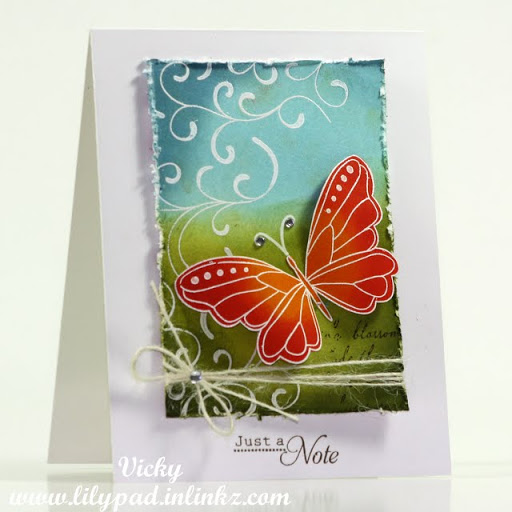
Today I am sharing a couple of cards. The first one is a card I made for Friday’s challenge at Lily Pad Cards. The challenge is to make a card inspired by just about anything you’ve seen on the blog the last month! Easy!!! I so adore this challenge. Just find a card you like and CASE it!
So in case you haven’t seen it this is my card inspired by the talented Tina.
The background is a piece of white cardstock where I heat embossed the stamp with white and then used my distress inks to color it. You can see me do this technique in another card in this video. I then done the same in another piece of white cardstock for the butterfly. After coloring the butterfly I cut it out and used 3d foam adhesive for more dimension. Check at the very bottom of the post for a supply list.
The next card is for this digi challenge. I have designed a digital kit named “Film set” that you can all download freely and use with your digital cutters OR print and cut out with your scissors. This set includes the very much wanted polaroid and film strip!!!
Here is the film set I designed:
Click here to download it and for more info and inspiration about this challenge!
Here is the card I made using the film strip from the above set and a printable set by Hero Arts:
For this card I used my digital cutter to cut out the film strip and then I created the background scene in a piece of white paper. I used distress ink for the sky, super quick coloring with copics for cloths and bird house. Let me know if you have any questions about this card and if would like a video featuring this die cut
A Christmas card today! I wanted to make a quick and easy to reproduce card so I thought I should use my digital cutter. Having a template and cutting out all the pieces multiple times is a great help when you want to make a set of the same cards. Anyway, here is the card which I totally love. I think it looks so elegant.
You can watch the video and then scroll down to download the templates and to view the list of supplies used.
Files: Warmest Wishes template - Downloaded (322) times
The template files are only available in .SVG
I am using Inkscape to design and cut with my CraftRobo. For those of you who don’t know, CraftRobo is the exact same machine as Xyron’s Wishblade. In fact, the CraftRobo was the original design until Wishblade bought the rights to manufacture the same machine for the U.S. market. If you don’t know how to use Inkscape to cut your files watch this post.
Supplies:
The stamp set I am using is by HeroArts called “Holiday Sayings” but I think it’s retired so I’ll link you to a couple of similar stamp sets full of Christmas sentiments.
Wednesday is here and today I am sharing a set of bugs!
How-to: Cut the template with your digital cutter and then paper piece each bug. You can select parts and cut them on colored paper or just use white paper and color it later with your markers or inks! Use 3d foam adhesive to bring them to life by adding some dimension on their eyes, wings etc.
Are they cute or what?! Click on the image below to download the template in different formats. If you use them don’t forget to comment here with a link! I’d love to see your creations!
- Downloaded (1126) times
Thank you for leaving a comment when you download a file!
Tip: You don’t own a digital cutter? No worries open the PNG using MW Word, resize as desired, print and cut with your good old scissors.
It’s Digital Wednesday again and here is an elegant set of damask style shapes. It is so easy to make such a set when you can use so many free dingbat fonts. This set is actually made using the Damask Free fonts available HERE. Click on the image below to download it!
- Downloaded (1485) times
Do you have a wish regarding the “Digital Wednesday” sets? What would you like to see? Leave me a comment and let me know!
I had a number of messages regarding the cutting of my SVG files using the SureCutsAlot software for Cricut.
So here is a short 101 tutorial on cutting my butterflies set. Once you’ve download the files here is what you have to do
If you enjoy this kind of videos leave me a comment and let me know what you would love to see when it comes to digital cutting.
Note: This is not this weekend’s regular video. Another one where I make a card will be posted as always
Today’s digital kit is a set of jigsaw puzzle templates.
I have so many ideas with this one and I’m sure I’ll be using this a lot in the future!
For now, here are a couple of very quick 3×3 cards just to illustrate the digis
(it took me about 5 min each LOL)
To download the templates just click on the image below.
Since I have posted my new envelope templates I got a number of emails asking me for more formats. So I have converted the files and now you can get four different formats in the available zipped file. The formats are:
.PDF for all those who don’t own a digital cutter, just print and cut with scissors
.GSD, .DXF, .SVG for your digital cutters.
Is there another format I haven’t converted to and you would like? Please let me know!
To download the updated file go here and scroll down.
I hope you all spend those days with the people you love, have a great Christmas dinner and get great presents LOL!
Here is a small gift from me to all my blog readers and fellow bloggers just to thank you for reading, commenting and inspiring me. So here is a free digital set of tags.
Just click on the image below to download the zipped file (1,4 MB)
- Downloaded (1738) times
You can print and cut them with your scissors or just use your digital cutter to do the job for you. The basic shapes are the green ones and for a 3D effect you can use the blue or the pink shapes on top.
If you like the set or have any problems using it just let me know by leaving a comment. I love reading your comments and I always reply to every question.
Note: This weekend there will be no “Weekend Video” since I am on holidays and even this message is actually scheduled. But there will be a late “weekend video” early next week.